This session introduces the core concepts behind large language models,
effective prompt engineering, and responsible use of AI in research.
Use Your Harvard-Affiliated Google Account
Important: For this course, you must access Google Gemini using your
Harvard-affiliated Google account (e.g., yourname@g.harvard.edu).
This ensures your data is protected by Harvard's enterprise security agreements.
See Why Use Harvard/HUIT Accounts below for details.
Prerequisites
Before the session, please verify that you can access Google Gemini:
Go to google.com and sign in with your Harvard-affiliated Google account (e.g., yourname@g.harvard.edu)
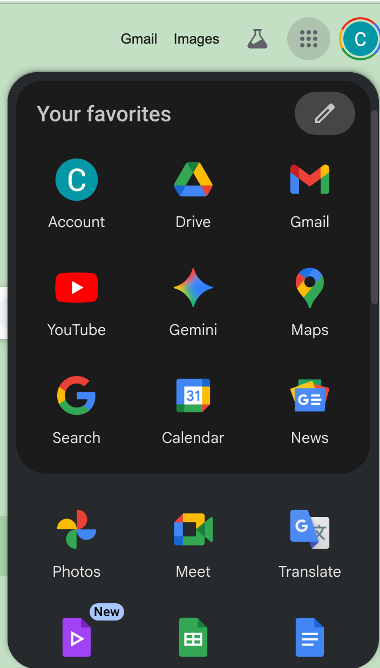
Look for the 3×3 grid of dots (⋮⋮⋮) in the upper right corner of the page, next to your profile picture
Click on this grid to open the Google apps menu
Verify that you see a menu similar to the one shown below, with various Google apps including Gemini (the colorful star icon)
Figure 1: Google apps menu showing Gemini access
Important: If you don't see the 3×3 grid of dots, or if Gemini is not in your apps menu,
please contact the instructors before the session. You may need to enable certain Google services or
use a different Google account.
Don't have a Harvard Google account? If you need to set up a
g.harvard.edu account, visit
Harvard Google Workspace
for instructions.
Accessing Google Gemini
For this session, we'll use Google's Gemini AI, which is accessible directly
from your web browser using your Harvard-affiliated Google account.
Note: Gemini may ask you to agree to terms of service when you first use it.
Review the terms, particularly regarding data usage and privacy, before proceeding.
Session Topics
In this session, we'll cover:
Introduction and OverviewWhat generative AI is and how it fits into research workflows
Google Gemini Tour and DemosModel selection, tools menu, file uploads, audio input, and hands-on prompting with a meal planning exercise
Pinned Demo ShowcaseImage generation, conference planning, talk posters and figures, physics simulations, and more
NotebookLM for Document AnalysisUpload research papers, get source-grounded answers with citations, and review a grant proposal against NSF guidelines
Ethics of AI in ResearchDisclosure, evolving norms, and having explicit conversations with advisors about AI use
Data Browsing with GeminiUpload a spreadsheet and explore what AI can tell you about your data
Custom AI Assistants with GemsCreate reusable, task-specific AI assistants with persistent prompts
Google AI Tools Comparison
This course will focus on three Google AI tools, each with different strengths:
Tool
Best For
Key Features
When to Use
Gemini
General-purpose AI assistant
Conversational interface
Code generation
Multi-turn dialogue
Image understanding
Writing, brainstorming, coding, general questions
NotebookLM
Document analysis & research
Upload your own documents
Source-grounded responses
Automatic citations
Summarization & synthesis
Analyzing papers, synthesizing research, literature review
Gems
Custom AI assistants
Pre-configured prompts
Persistent uploaded context
Reusable workflows
Shareable within research group
Repetitive tasks, specific workflows, domain expertise
Why Use Harvard/HUIT Accounts for Generative AI?
There are three important reasons to use Harvard's secured AI endpoints rather than personal accounts:
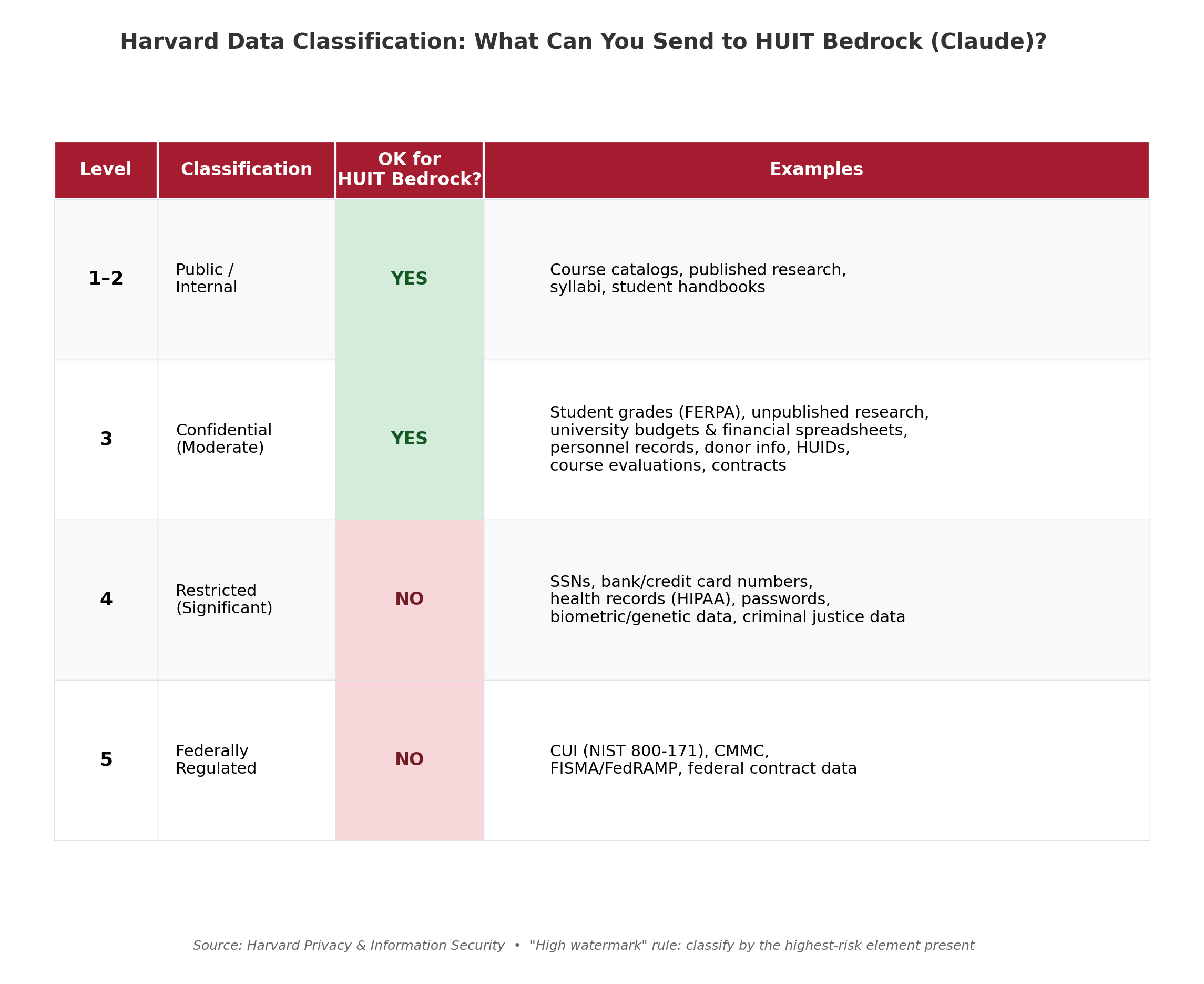
Cybersecurity: Data sent through Harvard's secure tunnel is not stored by the vendor and is not used for AI model training. Your inputs are protected by Harvard's enterprise agreements.
Privacy: You can upload early research results, draft papers, and data up to and including
Level 3 confidential data.
This would not be safe to do with a personal AI account.
Accounting: API usage fees can be directly linked to research grants through HUIT billing, providing clear cost tracking and proper attribution of expenses.
What Data Can You Send to AI Tools?
Using Harvard's secure endpoints (Gemini via your Harvard Google account or Claude
via HUIT Bedrock), you can send data classified up to
Level 3 (Confidential) — but not Level 4 or 5.
Harvard data classification levels and what can be sent through HUIT-secured AI endpoints.
Source: Harvard Privacy & Information Security.
Key rule: Use the "high watermark" principle — if any element in a file
is Level 4 (e.g., a column containing SSNs in an otherwise Level 3 spreadsheet),
the entire file is Level 4 and should not be uploaded.